Both platforms take exactly the same cut. OnlyFans deducts 20% of every payment a fan makes, and so does Fansly, which means the fee comparison that dominates most advice on this subject settles nothing at all. The decision rests on two things instead: how many paying fans each platform can realistically put in front of you, and how much control you get over the way your content is priced and unlocked. On the first count OnlyFans wins comfortably. On the second, Fansly is not merely ahead, it is operating in a different category.
Choosing wrong is not fatal, but it is expensive. Subscribers do not transfer between platforms. A creator who builds for a year and then moves starts the subscriber count at zero and has to persuade every existing fan to re-subscribe somewhere new, which most of them never do. Getting this right at the outset is worth more than any pricing adjustment you will make in your first year.
Short answer
Start on OnlyFans if you are building one page and want the largest possible pool of paying fans. It holds roughly 437 million registered fan accounts against an estimated 130 million on Fansly, and fans arrive already expecting to pay.
Start on Fansly if your model depends on pricing flexibility, paid tiers, or being found by people who were not already looking for you. Its permission engine and recommendation feed have no equivalent on OnlyFans.
Most established creators run both, treating OnlyFans as the revenue centre and Fansly as a second storefront that catches a different kind of traffic.
Similarities between Fansly and OnlyFans
Plenty of comparisons overstate the gap, so the shared ground is worth establishing first. These similarities are not trivial, and several of them catch new creators off guard regardless of which platform they pick.
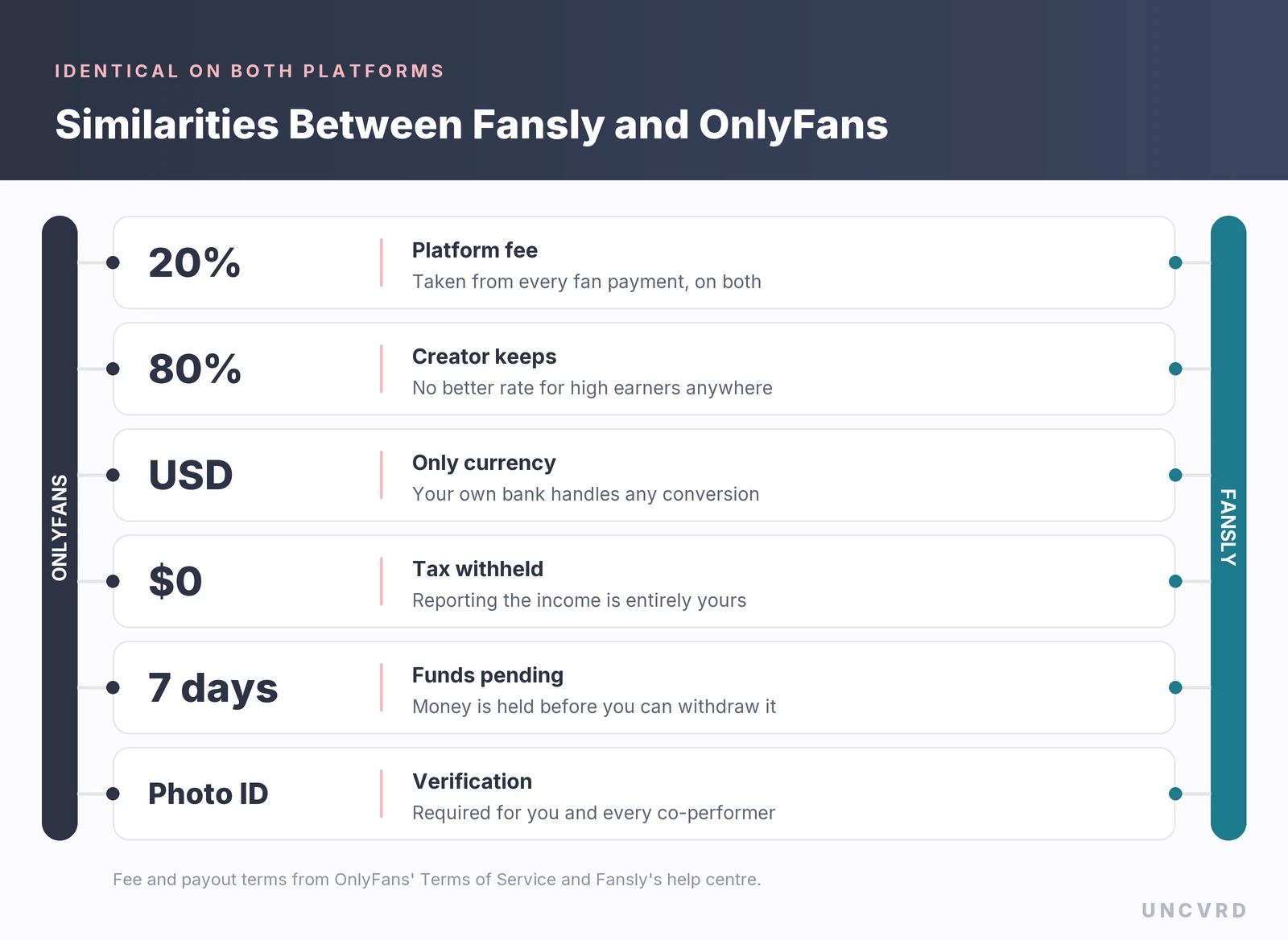
The revenue split is the headline. OnlyFans states the arrangement plainly in its Terms of Service: “Our fee for Creator Interactions is calculated as 20% of the total User Payment and will be deducted from each User Payment.” Fansly’s terms are reported to use almost identical language, giving creators eighty percent of revenue generated on subscriptions, sales and tips. Neither platform discounts that rate for high earners, and neither charges less on a tip than on a subscription.
Both operate entirely in US dollars. Fansly says so explicitly, and notes that any currency conversion is handled by your own bank at its rates. OnlyFans warns in its terms that payout amounts requiring conversion will carry conversion costs, and that your bank may add charges of its own. A creator outside the United States pays a quiet currency tax on either platform.
Neither company withholds tax. Fansly puts it bluntly: it does not withhold any taxes from funds you earn, and you are responsible for reporting them. The same logic applies on OnlyFans, whose terms reserve the right to restrict payouts from accounts that become tax non-compliant. US creators submit a W-9 to either platform; everyone else files a W-8BEN, a W-8BEN-E for a business or LLC, or a DAC7 form inside the EU.
Identity verification is mandatory in both places, and so is age verification for fans in a growing list of jurisdictions. Both platforms also claw back money when a fan wins a chargeback. OnlyFans’ terms allow it to deduct an amount equal to the creator’s portion of any refunded payment, and Fansly applies earnings adjustments in comparable situations.
Fansly vs OnlyFans at a glance
Here is the OnlyFans vs Fansly picture in a single view, with audited figures kept separate from estimates.
| OnlyFans | Fansly | |
|---|---|---|
| Platform cut | 20% of every fan payment | 20% of every fan payment |
| Launched | 2016 | November 2020 |
| Registered fan accounts | 437 million (audited, Nov 2025) | Around 130 million (estimate) |
| Registered creators | 5.1 million (audited, Nov 2025) | Around 2 million (rough estimate) |
| Monthly site visits | 300 to 360 million (estimates) | 43 to 50 million (estimates) |
| Subscription price | $4.99 to $49.99 a month | $5 to $499.99 a month |
| Subscription tiers | One price, plus multi-month bundles | Multiple priced tiers, built in |
| Locked content price | Reported $3 to $50 on posts, up to $100 in messages | $1 to $500, documented |
| Access rules | Subscribers, or a single unlock price | Permission engine with and/or conditions |
| Algorithmic discovery | None | For You Page plus profile tags |
| Pending period | Approximately 7 days | 7 days, documented per transaction |
| Payout minimum | $20 commonly reported | $20 to $100 depending on method |
| Team access | Shared login credentials | Management Sessions with scoped permissions |
| Photorealistic AI content | Governed by its acceptable use policy | Prohibited outright |
Why some of these are estimates. OnlyFans’ parent company, Fenix International, files audited accounts with UK Companies House, so its account numbers are verifiable. Fansly is privately held and publishes nothing, so every figure attached to it is a third-party estimate and the published ones disagree with each other. OnlyFans also keeps its pricing limits out of its public terms, and its help centre needs an account, so the locked-content figures above come from guides that conflict. Some report a $50 ceiling on feed posts and $100 in messages, others $200. Check the live values in your own dashboard before building a pricing plan on them.
Fansly vs OnlyFans fees, and what 20% actually costs you
Because the headline rate is identical, the interesting question is what the 20% applies to. On both platforms it comes off the gross payment, not off some net figure after processing. A fan who pays $10 produces $8 of creator earnings and $2 of platform revenue, every time, on subscriptions, tips, locked content and custom work alike.
That matters most when an agency sits in the chain, because agency commission is then charged on a number that has already been reduced. A creator comparing a 30% management fee against a 40% one is usually comparing percentages of the $8, not the $10, and the difference between gross and net is the single most expensive line in any management agreement.
What $10,000 in fan payments becomes
Set against that, the one real fee difference is structural rather than proportional. Fansly documents a $5 monthly inactive status charge, deducted from a dormant account’s wallet balance and repeating each month until the balance reaches zero or the account holder logs back in. For creators, Fansly says the spending balance is drawn down first and earnings after that. It is a small sum that quietly erodes an abandoned test account, and OnlyFans has no published equivalent.
OnlyFans and Fansly payouts differences
Fansly is unusually transparent here, publishing a breakdown that OnlyFans simply does not offer. Every Fansly transaction sits pending for seven days, unlocking at the exact hour it was earned a week later, so $5 earned at 1pm on the 13th becomes available at 1pm on the 20th. Payout requests are then reviewed, typically inside 48 hours, and most methods deliver within one to three business days once processing begins.
The minimum you can withdraw depends entirely on how you take the money, which is the detail most comparisons miss:
- Paxum and Cosmopayment: $20
- Local bank deposits in South America and Asia, plus USD ACH and CAD deposits: $20
- SEPA transfer for EU and UK banks: $50, though a request as low as $20 is accepted and sent automatically after 14 days if the cumulative total has not reached $50
- Cryptocurrency: $50 to $100 depending on the coin
- International SWIFT bank wire: $100
Fansly also batches international bank transfers and crypto payouts every three days, with a 72-hour cooldown after each one, so requests made inside that window are grouped into a single later transaction. Crypto, Paxum and Cosmopayment usually arrive in under 24 hours.
OnlyFans publishes far less. Its terms confirm only that a minimum payout threshold exists and that earnings become withdrawable once reflected in the account balance. The $20 minimum cited almost everywhere is consistent across third-party sources but is not something the company states publicly, and it varies by country and method. A creator on a SWIFT-only banking setup should assume a higher floor on either platform.
Key differences between Fansly and OnlyFans
Comparing the two platforms as a creator comes down to four things, and the revenue split is not one of them. Each of the four has a direct line to what a page earns in a month.
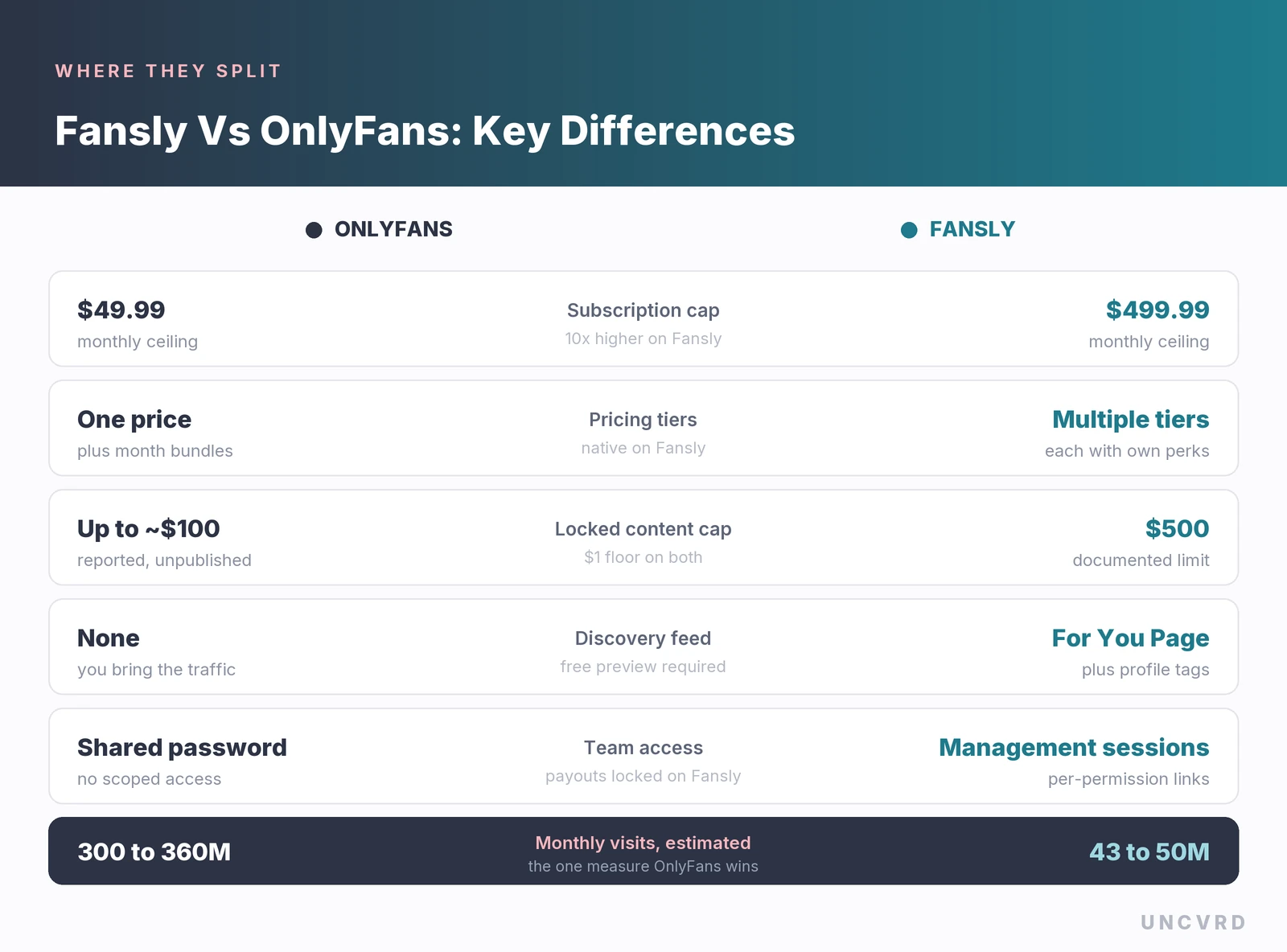
Fansly’s permission engine
This is the genuine gap between the two products, and it is routinely reduced to “Fansly has tiers”, which undersells it badly. Fansly lets you attach conditions to a single piece of content and combine them with either/or logic. A fan can be required to follow and pay $5. Alternatively a fan can unlock something by following or by paying a $10 one-time fee, their choice. Fansly’s own documentation gives the example that matters most: subscribers buy a photo for $5 while non-subscribers pay $30 for the same file.
Run that across a library and the effect compounds. The same content earns subscription revenue, upsell revenue at a discount, and full-price revenue from non-subscribers, without being uploaded three times or managed as three separate products. Tips count cumulatively toward a threshold too, so several small tips can unlock content that one large tip would have. OnlyFans gives you a subscription price, a bundle discount, and a single unlock price per item. For a creator whose earnings come mostly from locked content rather than subscriptions, that is a meaningful ceiling.
Fansly extends the same pricing logic into places OnlyFans does not reach. Text posts can be locked and sold. Audio posts can be published and monetised. Live streams can charge per chat message, restrict chat to subscribers or to fans who have bought media, and run tip goals.
Discovery, and why it cuts both ways
OnlyFans has no meaningful discovery. Nobody browses it looking for someone new, which is why the platform rewards creators who arrive with an audience and punishes those who expect the site to supply one. Every subscriber is one you sent there yourself, so anyone hoping to start an OnlyFans without followers has to build traffic elsewhere first.
Fansly runs a For You Page driven by a recommendation algorithm, supported by two separate tagging systems. Profile tags are private labels that tell the algorithm what you make, with Fansly suggesting examples like “cosplayer” or “redhead”, and they feed the Suggestions tab. Hashtags are public and work inside post captions and search.
Reaching that feed has conditions. Locked media needs a free preview to be eligible at all, the Post to FYP option has to be selected, and a timeline restricted to followers or subscribers needs Fansly’s internal discovery setting switched on. Private content is never promoted.
Profile text has no comparable job on OnlyFans. Its search covers only creator names and usernames, so the bio works on visitors you sent instead of finding new ones. That is why the strongest OnlyFans bio ideas name the niche and posting schedule within the first 160 characters.
Team and agency access
Fansly offers Management Sessions, which let a creator grant scoped access to an editor, assistant or agency without handing over login credentials. Each session is named, each link carries its own permission set, and payouts and account closure stay locked regardless of what else is granted. Access ends when the manager logs out, and a fresh link is needed to restore it.
OnlyFans has nothing comparable. Team access there means sharing the account password, which is precisely the arrangement that leaves creators locked out of their own pages when a relationship sours. Any OnlyFans management agency worth signing with should be able to explain how it handles credentials, and a contract that quietly depends on holding your only set deserves a hard look.
Subscription ceilings and tiers
OnlyFans caps monthly subscriptions at $49.99. Fansly allows up to $499.99, and supports several priced tiers natively rather than approximating them with bundles. Few creators need a $400 tier, but the tier structure itself is useful: different price points can carry genuinely different perks, which is hard to replicate on a single-price page.
The catch is on the fan side. Switching tiers on Fansly takes effect immediately and forfeits any remaining days on the previous tier, with no refund and no credit. Fans who upgrade mid-cycle lose what they already paid for, so it is worth telling them to wait until renewal. Both platforms support free trials and discounts; neither offers a free lifetime subscription, though Fansly notes you can set a multi-year term and replace it when it expires.
Earning potential, honestly
Scale is where OnlyFans separates itself, and the numbers are public because its parent company files audited accounts in the United Kingdom. Fenix International reported roughly 437 million registered fan accounts and 5.1 million registered creator accounts at the close of its 2025 financial year, up from 377.5 million and 4.63 million twelve months earlier. Revenue reached about $1.6 billion, a 10% rise, with pre-tax profit of $715 million. Around $6.2 billion reached creators in that single year, and in August 2026 the Financial Times reported total payments to creators since 2016 had passed $30 billion. A minority stake sale in May 2026 valued the company at $3.15 billion.
Fansly discloses none of this. It publishes no user count, no creator count and no payment volume, so every figure in circulation is an outside estimate. The most frequently repeated puts it near 130 million registered users, roughly 30% of OnlyFans’ fan accounts, with traffic estimates in the range of 43 to 50 million monthly visits against 300 million or more for OnlyFans. Creator counts around 2 million appear in promotional sources and should be treated as the softest number here. Where you see a confident Fansly statistic, check who produced it.
Against the billions, one figure deserves more attention than it usually gets. The average OnlyFans income works out at around $1,300 a year per creator account. Roughly 2.5 million of the 5.1 million registered creator accounts were reported as active during 2025. That average is dragged down by millions of dormant pages, so it is not a forecast for someone working seriously. It is an accurate description of what happens when a page is created and then left to be discovered by a platform that has no discovery. The money on OnlyFans is real and very large in aggregate, and it is distributed with brutal unevenness.
So which should you start on?
Match the platform to your actual situation rather than to a feature list.
Start with OnlyFans if
- You already have followers anywhere and intend to convert them now. Fan intent and name recognition are worth more than any feature.
- You want one page, one link and the least possible complexity.
- Your revenue will lean on subscriptions and direct-message sales rather than an intricately tiered catalogue.
- You want to be earning quickly, since verification is the lighter of the two.
Start with Fansly if
- You are building without an existing audience and want a feed that can surface you to strangers.
- Your plan depends on price discrimination, with the same content sold at different prices to followers, subscribers and everyone else.
- You want paid tiers with genuinely distinct perks rather than multi-month discounts.
- You work with an agency, an editor or an assistant, and scoped access without shared passwords matters to you.
- You sell written or audio content, which Fansly monetises natively.
Run both if
- You have the content volume to keep two pages genuinely active, since a neglected second page earns nothing and accrues inactivity penalties.
- Your audience spans regions where payment preferences differ, and Fansly’s wider payout options help.
- You want insurance. The 2021 episode, when OnlyFans announced a ban on sexually explicit content and reversed it six days later after creator backlash, is the reason Fansly exists at scale. It drove a surge of sex workers onto the alternative almost overnight. Platform risk is not hypothetical in this industry.
The order matters more than the choice. Establish one page properly, with a working traffic system behind it, before adding a second. Two half-run pages reliably earn less than one page given full attention.
Conclusion
The fee question that brings most creators to this comparison turns out to be a dead end. Both platforms keep 20% of everything a fan pays, both pay in dollars, both hold funds for about a week, and neither withholds a cent of tax. Anyone presenting a payout percentage as the reason to pick one is either working from old information or selling something.
What separates them is narrower and more useful. OnlyFans has the audience, the payment volume and the fan expectation, with 437 million registered fan accounts and audited numbers to prove it, and it gives you a single price with a single unlock fee and no help finding anyone. Fansly has the better product by a clear margin, with a permission system that lets one file earn at three different prices, native tiers up to $499.99, a recommendation feed, documented payout terms and the only sane answer either platform offers to team access. What it cannot show is proof of an audience, because it has never published one.
For most creators starting now, that points to OnlyFans first, for the simple reason that a storefront on a busy street beats a better-designed storefront on a street nobody can measure. Fansly earns its place second, and earns it quickly for creators whose content suits tiered and permission-based pricing. Both decisions are reversible and neither is the one that determines your income. The traffic you build is, and that work looks identical regardless of which logo sits above the checkout.
Frequently asked questions
How does the fan experience differ between Fansly and OnlyFans?
Following a creator on Fansly costs nothing and stays permanently available, and subscribing makes you a follower automatically, which hands creators an audience they can market to later. OnlyFans works as a straight paywall instead, so a visitor who does not subscribe leaves no trace at all. Some Fansly creators do require a verified payment method even for a free follow, which does not oblige the fan to buy anything. Subscriptions renew automatically on both platforms until cancelled, and OnlyFans wallet credits are explicitly non-refundable, with a purchase larger than the remaining balance charged in full to the card rather than split.
What happens to a Fansly account that stops being used?
Fansly applies a $5 inactive status charge to dormant accounts, deducted from the wallet balance and repeating every month until that balance reaches zero or the account holder logs back in. Creators should note the order it draws in: the spending balance goes first, then earnings. Accounts left inactive for six months or longer can also trigger refunds to fans with matching earnings deductions. Logging in occasionally, keeping a subscription active or sending a tip all reset the clock, and OnlyFans has no published equivalent charge.
Do fans lose money when they switch Fansly subscription tiers?
Switching tiers on Fansly takes effect immediately and forfeits every remaining day on the previous tier, with no refund and no credit carried across. A warning appears before the change is confirmed, but the forfeited time is non-refundable once accepted. Creators running several tiers do better telling fans to upgrade at the end of a billing cycle rather than mid-month, since an enthusiastic upgrade that costs someone two paid weeks is a poor first experience. OnlyFans sidesteps the problem by having no native tiers to switch between.
When can a refund be taken out of a creator’s earnings?
Three documented situations on Fansly can reverse a sale after the money has already landed in your wallet. Custom content not delivered inside two weeks, or inside whatever timeframe was agreed with the fan, can be refunded with an earnings adjustment. An account inactive for six months or more can produce refunds or deductions of its own. Confusion about what a subscription or custom request actually included is the third, which is why precise descriptions are worth the effort. Fansly says it contacts the creator first and offers a chance to resolve matters directly with the fan. OnlyFans separately reserves the right in its terms to deduct the creator’s portion of any successful chargeback.
Is AI-generated content allowed on Fansly?
Photorealistic AI content is prohibited, and Fansly states that labelling something as AI-generated does not make it permissible. Its terms specifically rule out lifelike synthetic media including deepfakes and face-swapped material, AI systems that interact with users to generate personalised responses without human oversight, and any content presenting AI-generated work as authentic human performance. Non-photorealistic virtual creators are welcome, but still have to register with real government-issued identification and pass standard verification before operating under a persona, and voice-only co-performers need verifying as co-performers. Creators planning AI-assisted work should check OnlyFans’ current acceptable use policy separately, since its rules differ and have been revised.
Which platform is easier to get approved on?
Fansly runs the stricter process of the two. Applications go through a gated two-stage flow with identity and age verification handled by Ondato, a third-party provider, and they can be declined, with specific conditions governing when and how you may reapply. Creating a new account means starting the whole application again. OnlyFans verification is generally regarded as the lighter path, so a creator who wants to be selling this week will usually find it the faster route. Both platforms require government-issued identification, and both verify every co-performer who appears in your content.
Where is age verification now mandatory for fans?
Fans in the United Kingdom, Australia, Brazil and Germany face mandatory checks under the Online Safety Act, the Online Safety Act 2021, ECA Digital and JMStV respectively. Inside the United States, twelve states have passed age-verification legislation: Alabama, Florida, Georgia, Kansas, Louisiana, North Carolina, North Dakota, Oklahoma, South Carolina, South Dakota, Tennessee and Texas. Verification normally runs through a live selfie, escalating to government ID where more assurance is needed, and usually completes inside a minute. North Carolina adds consent-form requirements under HB 805, and England and Wales now restrict certain content under the Crime and Policing Act 2026. Every verification step between a fan and your content costs conversions, and that pressure applies across the industry rather than to one platform.